Archives 2026

wp2shell: Critical WordPress Core RCE

What You Need to Know

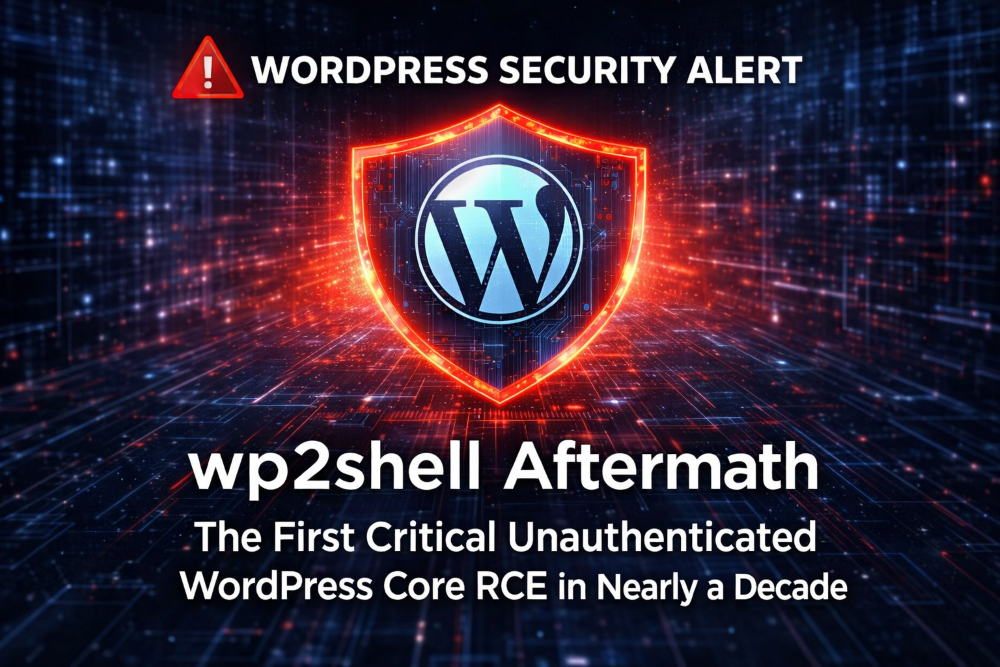
On Friday, July 17, 2026, the WordPress Security Team released emergency security updates for WordPress Core addressing two vulnerabilities that, when chained together, allow unauthenticated remote code execution. The chain, now widely known as wp2shell, is the first critical unauthenticated RCE in WordPress Core in nearly a decade.

If you run a WordPress site, this one matters. Exploitation does not require a vulnerable plugin, a vulnerable theme, or a logged-in attacker. A vulnerable WordPress installation exposed to the public internet is enough.

The short version

wp2shell chains two separate vulnerabilities in WordPress Core:

  • CVE-2026-60137 – an unauthenticated SQL injection issue involving the author__not_in query parameter.
  • CVE-2026-63030 – a REST API batch request route-confusion issue that can be chained with the SQL injection to achieve remote code execution.

The chain was discovered and responsibly disclosed by Adam Kues of Assetnote / Searchlight Cyber. His technical writeup explains how the batch API validation and execution paths could be desynchronised, allowing attacker-controlled parameters to reach a route that would normally sanitise them. From there, the SQL injection can be leveraged through WordPress post caching, oEmbed cache rows, changesets, and action hooks to create a rogue administrator account and execute code through normal admin capabilities, such as uploading a plugin.

In practical terms: successful exploitation gives an attacker full administrative control of your WordPress site and the ability to execute code with the privileges of the web server.

What is remote code execution?

Remote code execution (RCE) means an attacker can run their own code on your website’s server, from anywhere in the world, without needing a username or password. In plain English: a stranger can take control of your website without ever logging in.

RCE is the most serious category of web vulnerability. It is not just someone defacing your homepage – it is someone being able to install malware, steal your customer data, send spam from your domain, or use your server to attack other websites.

Who is affected

The affected versions differ slightly between the two vulnerabilities:

  • WordPress 6.9.x – affected by both vulnerabilities. Patched in 6.9.5.
  • WordPress 7.0.x – affected by both vulnerabilities. Patched in 7.0.2.
  • WordPress 6.8.x – affected by the SQL injection only. Patched in 6.8.6.
  • WordPress 6.7 and earlier – not affected.

Because 6.8.x is not exposed to the REST API route-confusion issue, it is not vulnerable to the full RCE chain – but it should still be updated promptly to address the SQL injection.

If your site runs WordPress 6.8.x, 6.9.x, or 7.0.x, confirm immediately that it has updated to the appropriate patched version.

Why didn’t my site update automatically?

WordPress enabled forced automatic updates for this release because of its severity. In theory, that means most sites should have patched themselves within hours of the July 17 release. In practice, many sites did not. Common reasons include:

  • Automatic updates disabled in wp-config.php – a developer may have added define( 'AUTOMATIC_UPDATER_DISABLED', true ); at some point.
  • A plugin is blocking updates – some “update manager” or security plugins override WordPress’s default update behaviour.
  • Managed hosting settings – some hosts delay or gate core updates behind their own testing process.
  • File permission problems – if WordPress cannot write to its own files, the update silently fails.
  • The site is pinned to an older branch – sites on 6.8.x only receive the 6.8.6 update, not 7.0.2.

Do not assume your site patched itself just because WordPress said it would. Log in and check the version number. It takes ten seconds.

How quickly this is being exploited

This is the part that should worry you. According to Wordfence’s telemetry (all times IST):

  • July 17, 2026 – WordPress releases patched versions 6.8.6, 6.9.5, and 7.0.2. Forced automatic updates are enabled due to severity.
  • July 18, 00:29 IST – First exploit-shaped probing observed against the REST API batch endpoint.
  • July 18, 00:42 IST – First clear SQL injection attempt observed.
  • July 18-19 – Proof-of-concept exploit code and independent reproductions begin circulating publicly.
  • July 20 – Searchlight Cyber publishes Adam Kues’ full technical writeup, along with a public checker at wp2shell.com.

Exploitation activity began within hours of the patch release. Sites that did not update promptly were exposed while public technical details were circulating and attackers were already probing for vulnerable installations.

How to update WordPress

Before you update: make sure you have a recent backup of your site. Most hosting control panels include a one-click backup tool, and the update itself is very safe – but if anything does go wrong, a backup means you can roll back in minutes rather than rebuilding from scratch. If you are not sure how to take a backup, ask us before proceeding.

There are three ways to get your WordPress site updated:

  1. Contact your web designer. If someone built or maintains your site, they should be your first call. Ask them to confirm your WordPress Core version and update to 6.8.6, 6.9.5, or 7.0.2 as appropriate.
  2. Update WordPress via your hosting control panel. Most hosting plans include a one-click WordPress updater. Log in to your hosting control panel, find the WordPress or Softaculous section, and run the update from there. Alternatively, log in to your WordPress admin area and go to Dashboard → Updates.
  3. Contact us and we will update WordPress for you. If you would like WebWorld to handle the update, open a support ticket and we will take care of it. This is a paid service – we will confirm the cost with you before any work begins.

How do I know if I’ve already been hacked?

This is the question most people ask after reading about a vulnerability like this. Here are the warning signs to look for:

  • Unfamiliar administrator accounts – in wp-admin, go to Users → All Users and check every account with the Administrator role. If you see one you did not create, treat the site as compromised.
  • Plugins or themes you did not install – check Plugins → Installed Plugins and Appearance → Themes for anything new.
  • Unexpected posts, pages, or spam links – especially pharmaceutical, gambling, or crypto content you did not write.
  • Changed files – if you have a file-integrity plugin (Wordfence, Solid Security, etc.), review its scan results for modified core files.
  • Google Search Console warnings – “This site may be hacked” or “Deceptive site ahead” notices.
  • Sudden traffic spikes or strange outbound traffic – your hosting control panel’s bandwidth graphs can show this.
  • Visitors reporting browser warnings – red “dangerous site” interstitials from Chrome or Firefox.

You can also run your site through the public checker at wp2shell.com to confirm whether it is still vulnerable.

If any of the above looks familiar, do not just patch and move on. Patching closes the door, but it does not remove an attacker who is already inside. A compromised site needs to be professionally cleaned – contact us or your web designer immediately.

After updating: what to check

Once your site is patched, take a few minutes to verify everything is clean:

  1. Confirm the update completed successfully. Check the version number in the bottom-right corner of wp-admin, or go to Dashboard → Updates.
  2. Review administrator accounts for any unexpected users (Users → All Users).
  3. Review recent plugin uploads and file changes for anything you did not authorise.
  4. Check your site with the public checker at wp2shell.com.
  5. If you have Wordfence installed, review firewall logs for blocked requests to /wp-json/batch/v1 or ?rest_route=/batch/v1.

Because the impact can include administrator creation and code execution, any suspected exploitation should be treated as a potential full site compromise. If you find anything suspicious, contact us or your web designer immediately.

What happens if I do nothing?

If your site stays unpatched, the realistic outcomes over the coming weeks are:

  • Site defacement or malware installation – your homepage replaced, or malicious scripts injected into every page.
  • Your site used to attack others – compromised sites are routinely used to send spam, host phishing pages, or launch attacks on other servers. Your domain’s reputation goes with it.
  • Blacklisting by Google – once Google detects malware, your site is flagged in search results and browsers show a red warning screen to visitors. Getting removed from the blacklist takes days to weeks after cleanup.
  • SEO damage – spam content and blacklisting can undo years of search ranking work.
  • Customer data theft – if your site stores any personal data (contact forms, orders, accounts), a breach may be a notifiable incident under GDPR. That means reporting to the Data Protection Commission within 72 hours and potentially notifying affected customers. The reputational and regulatory cost of that dwarfs the cost of an update.

Updating takes minutes. Recovering from a compromise takes days, and the consequences can follow your business for months.

The bottom line

wp2shell is one of the most significant WordPress Core security events in recent years. The combination of unauthenticated reachability, no plugin or theme requirement, a massive global attack surface, a path to administrator access and code execution, and publicly available proof-of-concept code makes this vulnerability chain unusually serious.

The WordPress Security Team moved quickly to release patched versions, but public exploit activity began within hours. Patching remains the single most important step you can take.

If you have not already confirmed that your site is running a patched WordPress version, do that now.

WebWorld Is Now an Official .ie Gold Partner

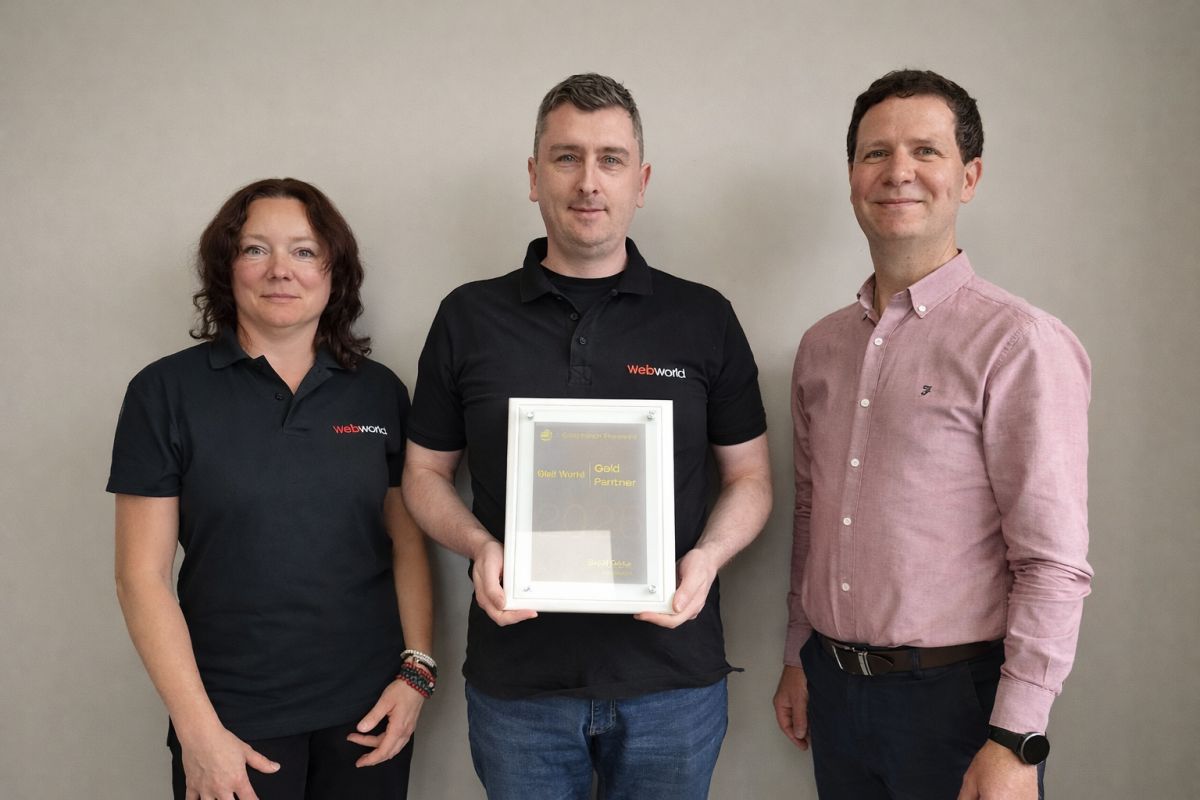
WebWorld is proud to announce that we have been awarded .ie Gold Partner status, an official accreditation granted by the .ie Domain Registry, recognising excellence, trust, and leadership in Ireland’s domain and hosting industry.

This achievement reflects our long-standing commitment to helping Irish businesses, organisations, and entrepreneurs build a secure and successful online presence.

What Being a .ie Gold Partner Means

As a .ie Gold Partner, Web World has met the highest standards set by the .ie Domain Registry. This accreditation is awarded only to providers who demonstrate:

  • Expert knowledge of .ie domains
  • Exceptional customer service and support
  • Proven reliability in domain management
  • Strong commitment to Ireland’s digital identity

For our customers, this means you’re working with a partner who is officially recognised for quality, trust, and expertise.

Why This Matters for Your Business

Choosing a .ie domain is choosing an online identity rooted in Ireland — trusted by Irish consumers and recognised globally. As a Gold Partner, Web World can offer:

  • Faster, smoother .ie registrations
  • Expert guidance on choosing and securing your domain
  • Priority access to updates, policies, and best practices from the .ie Registry
  • Enhanced security and compliance for your online presence

Your domain is the foundation of your digital brand. With Web World, you’re backed by one of Ireland’s most trusted accredited providers.

Strengthening Ireland’s Digital Future

This accreditation reinforces our mission: to support Irish businesses with world‑class hosting, domain services, and digital infrastructure. Whether you’re launching a new venture, expanding your brand, or upgrading your online presence, Web World is here to help you grow with confidence.

If you’d like help choosing the right domain or improving your online setup, you can contact us directly by emailing sales@webworld.ie

Why Email Forwarders Are No Longer Reliable

For many years, email forwarding was considered a simple and convenient way to manage business communications. Companies could create professional email addresses such as info@yourcompany.com and automatically forward incoming messages to a Gmail, Outlook, or Yahoo inbox.

While this setup worked well in the past, it is becoming increasingly unreliable. Businesses are reporting missing emails, messages landing in spam folders, and important communications that never reach their intended recipients.

At Web World, we regularly help clients troubleshoot email delivery issues, and one common factor continues to emerge: traditional email forwarding is no longer the dependable solution it once was.

What Changed?

The email landscape has evolved significantly over the last few years. Major providers such as Gmail, Microsoft Outlook, and Yahoo have strengthened their security requirements to combat spam, phishing attacks, and email spoofing.

As a result, email authentication protocols now play a critical role in determining whether a message is delivered successfully.

The three most important authentication standards are:

  • SPF (Sender Policy Framework)
  • DKIM (DomainKeys Identified Mail)
  • DMARC (Domain-based Message Authentication, Reporting and Conformance)

These technologies help receiving mail servers verify that an email is genuinely sent by the domain it claims to represent.

Why Email Forwarding Causes Problems

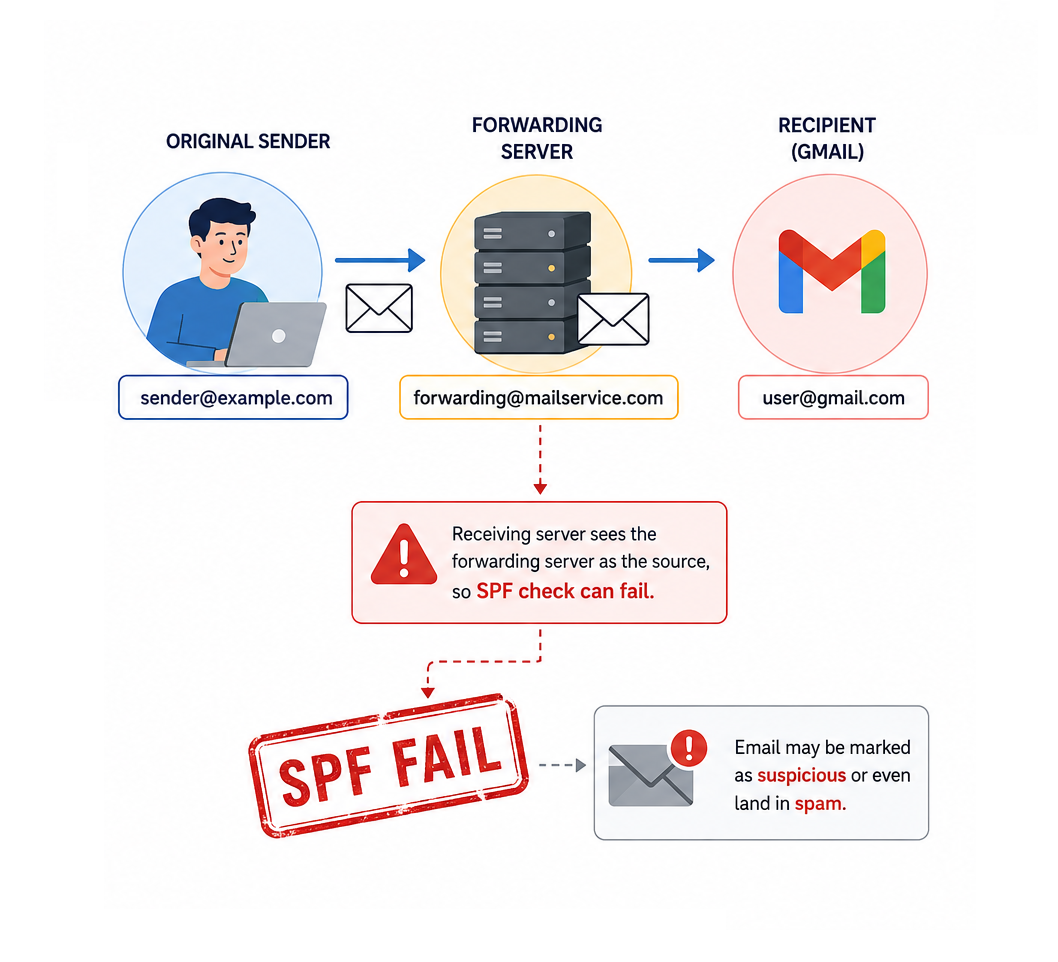
When an email is forwarded, it passes through an additional mail server before reaching its final destination.

Although the message itself may be legitimate, the forwarding process can interfere with modern authentication checks.

SPF Failures

SPF records specify which servers are authorized to send email on behalf of a domain.

When a forwarded email arrives at Gmail or another provider, the receiving server may see the forwarding server—not the original sender—as the source of the message.

This can cause SPF validation to fail, making the email appear suspicious even though it originated from a trusted sender.

DKIM and Message Integrity

DKIM adds a digital signature to outgoing messages.

During the forwarding process, certain email headers may be modified. Even minor changes can sometimes affect the validation of the DKIM signature.

If both SPF and DKIM checks fail, the receiving server may reject the message entirely based on the sender’s DMARC policy.

Stricter Policies from Major Providers

Recent updates from Google and Yahoo have introduced stricter requirements for email authentication, especially for domains sending large volumes of email.

While these changes improve overall email security, they also expose weaknesses in older forwarding-based setups that many businesses still rely on.

The Risks for Businesses

Email delivery problems can have serious consequences.

A missed email could mean:

  • Losing a potential customer inquiry
  • Missing a quote request
  • Delaying support responses
  • Disrupting communication with suppliers or partners
  • Damaging customer trust

The most concerning aspect is that these failures often happen silently. Neither the sender nor the recipient may realize that a message was blocked or discarded.

Better Alternatives to Email Forwarding

1. Use Direct Mailbox Access

Instead of forwarding messages, consider accessing your business mailbox directly through webmail, desktop email clients, or mobile applications.

This approach preserves the original authentication chain and significantly improves delivery reliability.

2. Connect Your Mailbox to Gmail or Outlook via POP3 or IMAP

Many businesses prefer using Gmail or Outlook as their primary interface. Rather than forwarding messages, these platforms can retrieve email directly from your hosting account using POP3 or IMAP.

This method avoids many of the authentication issues associated with traditional forwarding.

3. Upgrade to a Professional Email Platform

Solutions such as Google Workspace and Microsoft 365 provide enterprise-grade email infrastructure, advanced security features, and improved deliverability.

For businesses that rely heavily on email communication, these platforms often provide the most reliable long-term solution.

4. Review Your Email Authentication Settings

Properly configured SPF, DKIM, and DMARC records are essential for modern email communication.

Regular audits of your domain’s email configuration can help identify issues before they impact business operations.

How Web World Can Help

Email systems have become far more complex than they were a decade ago. What worked perfectly in the past may now create hidden delivery problems that affect your business every day.

At Web World, we help businesses review their email infrastructure, improve email authentication, and implement modern solutions that ensure important messages reach their destination.

Whether you are experiencing delivery issues or simply want to future-proof your email setup, our team can help you choose the right solution for your business.

Final Thoughts

Email forwarding remains a convenient feature, but it should no longer be viewed as a guaranteed method of email delivery.

As email providers continue to strengthen security standards, businesses need to adapt by implementing modern email practices and authentication methods.

Taking action now can help prevent missed opportunities, improve communication reliability, and ensure your business remains connected to customers when it matters most.

Dirty Frag (CVE-2026-43284)

Dirty Frag (CVE-2026-43284): What you need to know.

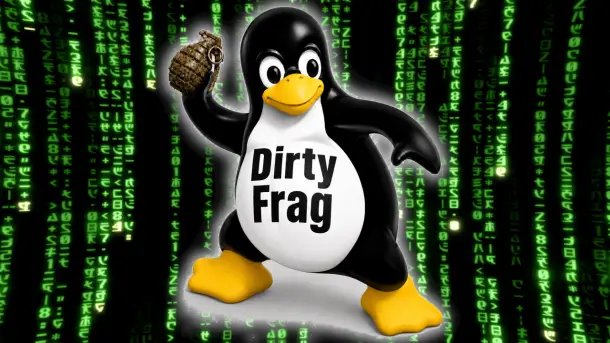
On May 8, 2026, the Linux kernel project assigned CVE-2026-43284 to a vulnerability now being discussed publicly as Dirty Frag. Early public discussion describes it as a potentially broad Linux local privilege escalation issue, but the official NVD entry is more precise: the bug sits in the Linux kernel networking stack, specifically around ESP-in-UDP handling, splice-backed packet buffers, and shared skb fragments.

At the time of writing, NVD has published the record but has not yet assigned a CVSS score. Even so, kernel and security teams should treat this as a patch-priority issue because it involves kernel memory ownership assumptions and in-place modification of packet data.

The short version

Dirty Frag is caused by a mismatch in how the Linux kernel marks packet buffers that contain pages spliced from a pipe.

TCP already marks these buffers with SKBFL_SHARED_FRAG, warning later code that the skb contains shared fragments and must be copied before modification. Some IPv4 and IPv6 UDP datagram paths did not set the same flag when using MSG_SPLICE_PAGES.

That matters because ESP input processing can decrypt packet data in place. If an ESP-in-UDP packet is backed by shared pipe pages but is not marked as shared, the kernel may treat it like privately owned skb data and modify it directly.

In plain English: the kernel could decrypt into memory it did not privately own.

Why this is risky

Kernel networking code relies heavily on ownership rules: before modifying packet data, code needs to know whether the memory is private or shared. If that bookkeeping is wrong, security boundaries can start to blur.

The official NVD description says the vulnerable path leaves an ESP-in-UDP packet made from shared pipe pages “looking like an ordinary uncloned nonlinear skb.” ESP input then takes a fast path that avoids copy-on-write and decrypts in place.

That is the heart of Dirty Frag:

  • MSG_SPLICE_PAGES can attach pipe-backed pages directly to an skb.
  • TCP correctly marks these as shared fragments.
  • IPv4/IPv6 UDP datagram splice paths did not.
  • ESP input could therefore skip copy-on-write.
  • Packet data could be modified in-place even though the skb did not privately own the backing pages.

What was fixed

The Linux kernel fix does two things:

  1. Marks IPv4/IPv6 datagram splice fragments with SKBFL_SHARED_FRAG, matching TCP behavior.
  2. Makes ESP input fall back to skb_cow_data() when that flag is present, ensuring ESP does not decrypt externally backed fragments in place.

The NVD description also notes that ESP output was intentionally left unchanged because the problematic trailer-appending path is not reachable for nonlinear skbs in the same way.

Who should care

Prioritize investigation if you run:

  • Linux systems with untrusted local users
  • multi-tenant Linux environments
  • container or Kubernetes hosts where local kernel attack surface matters
  • systems using IPsec / ESP-in-UDP paths
  • environments that allow workloads to exercise advanced networking APIs

Even if exploitation requirements turn out to be narrower than early “universal LPE” language suggests, this is still kernel-space memory ownership logic. That puts it in the category of issues defenders should not ignore.

Detection and response

There is no simple log line that proves exploitation from normal system logs. Response should focus on exposure reduction and patch verification.

Recommended steps:

  1. Track vendor advisories for your distribution or kernel provider.
  2. Patch to a kernel containing the Dirty Frag fix as soon as packages are available.
  3. Prioritize shared and multi-user systems before single-user endpoints.
  4. Review workloads that rely on IPsec, UDP encapsulation, or high-performance splice/send paths.
  5. Limit untrusted local code execution where patching is delayed.
  6. Reboot after kernel updates unless your live-patching provider explicitly confirms coverage.

Current status

  • CVE: CVE-2026-43284
  • Nickname: Dirty Frag
  • Affected component: Linux kernel networking stack, ESP/UDP skb fragment handling
  • Published: May 8, 2026
  • CVSS: Not yet provided by NVD at time of writing
  • Fix direction: Mark UDP splice fragments as shared and require copy-on-write before ESP in-place decrypt

References

  • NVD: CVE-2026-43284
  • Openwall oss-security discussion: “Dirty Frag: Universal Linux LPE”
  • Linux stable kernel commits referenced by NVD

How to fix Dirty Frag CVE-2026-43284

Customers should treat Dirty Frag as a kernel update issue. The safest fix is to install a Linux kernel version that includes the upstream patches for CVE-2026-43284.

1. Check whether your system is affected

First, check the running kernel version:Copy

uname -r

Then compare it against your Linux vendor’s advisory for CVE-2026-43284.

Affected status depends on the kernel version and whether your distribution has already backported the fix.

2. Update the kernel

Install the latest kernel updates from your distribution.

For Debian or Ubuntu-based systems:Copy

sudo apt update
sudo apt upgrade

For AlmaLinux, RHEL, CentOS Stream or Rocky Linux: Copy

sudo dnf update kernel

For older RHEL/CentOS systems:Copy

sudo yum update kernel

For SUSE-based systems:Copy

sudo zypper update kernel-default

For Arch Linux:Copy

sudo pacman -Syu

3. Reboot into the patched kernel

Kernel updates usually do not fully take effect until the system has rebooted.Copy

sudo reboot

After rebooting, confirm the active kernel:Copy

uname -r

Make sure the running kernel is the updated version, not the old vulnerable one.

4. Prioritize exposed or multi-user systems

Patch these systems first:

  • shared hosting servers
  • Kubernetes and container hosts
  • VPN/IPsec gateways
  • systems with untrusted local users
  • developer workstations running untrusted code
  • internet-facing Linux infrastructure

5. If you cannot patch immediately

If an immediate kernel update is not possible, reduce exposure until patching can be completed:

  • restrict untrusted local shell access
  • avoid running untrusted containers or workloads
  • limit access to systems using IPsec or ESP-in-UDP where possible
  • apply vendor-recommended mitigations if provided
  • monitor distribution security advisories for temporary workarounds

These mitigations should be treated as temporary. They are not a replacement for patching.

6. Verify with your vendor

Because many enterprise Linux vendors backport security fixes without changing the major kernel version, do not rely only on upstream kernel version numbers.

Check the advisory from your OS vendor, for example:

  • Ubuntu Security Notices
  • Debian Security Advisories
  • Red Hat CVE database
  • SUSE Security Advisories
  • Amazon Linux Security Center
  • Oracle Linux Errata
  • distro-specific kernel changelogs

Bottom line

Dirty Frag is a reminder that small ownership flags in kernel networking code can carry big security consequences. The bug is not about flashy malware or a misconfigured service; it is about whether the kernel knows it owns the memory it is about to modify.

For defenders, the action is straightforward: watch your vendor advisory feed, patch affected kernels, reboot, and prioritize systems where untrusted users or workloads can reach kernel networking paths.

Two Critical Server Vulnerabilities You Need to Patch This Week

We’ve had two significant server vulnerabilities disclosed this week, and both warrant immediate attention from anyone running Linux servers or cPanel-based hosting.

What’s Been Disclosed

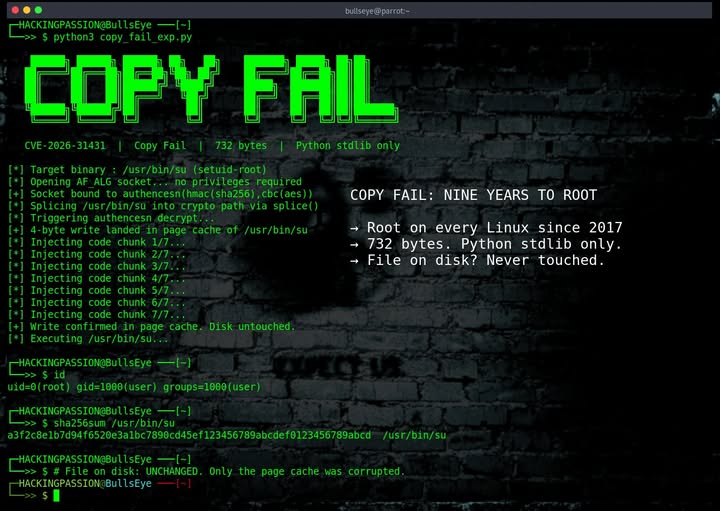
CVE-2026-31431 (“Copy Fail”) A flaw in the Linux kernel that could allow a local user to gain unauthorized root access. While it requires local access to exploit, on shared hosting environments or any server with multiple user accounts, this is a serious privilege escalation risk.

CVE-2026-41940 – A critical authentication bypass vulnerability in WHM/cPanel that could allow remote attackers to gain administrative access. This one is particularly nasty because it’s remotely exploitable, no prior access required.

Why This Matters

Most hosting environments in Ireland (and globally) run some flavour of Linux, and a huge portion of shared and reseller hosting sits on top of cPanel/WHM. That means these two CVEs together cover a substantial slice of the web hosting world.

If you manage your own server, VPS, or dedicated box, these are on you to patch. If you’re on managed hosting with us at WebWorld, we’ve already taken care of it across our infrastructure.

Are You Vulnerable to Copy Fail?

To make life easier, we’ve put together a free tool that lets you check whether your domain is running on a server that’s still exposed to the Copy Fail bug:

🔗 https://www.checkdomain.ie/copyfail/

Just enter your domain and we’ll do the rest. No login, no signup just a quick check.

How to Fix Them

For Copy Fail (CVE-2026-31431):
Update your Linux kernel to the latest patched version. On most distributions, that’s:Copy

# Debian/Ubuntu
sudo apt update && sudo apt upgrade -y
sudo reboot

# RHEL/CentOS/AlmaLinux/Rocky
sudo dnf update -y
sudo reboot

A reboot is required for the new kernel to take effect.

For the cPanel/WHM bug (CVE-2026-41940):
Simply update cPanel to the latest version. If you’ve got automatic updates enabled, you may already be patched, but it’s worth logging in and double-checking. You can run:Copy

/scripts/upcp --force

…from the command line as root to force an update immediately.

Need a Hand?

If you’re not sure whether you’re vulnerable, or you’d rather someone else handle the patching, get in touch. We can audit your server, apply the fixes, and verify everything’s locked down properly.

Warning About Fake Domain Renewal Emails From IDS Ireland

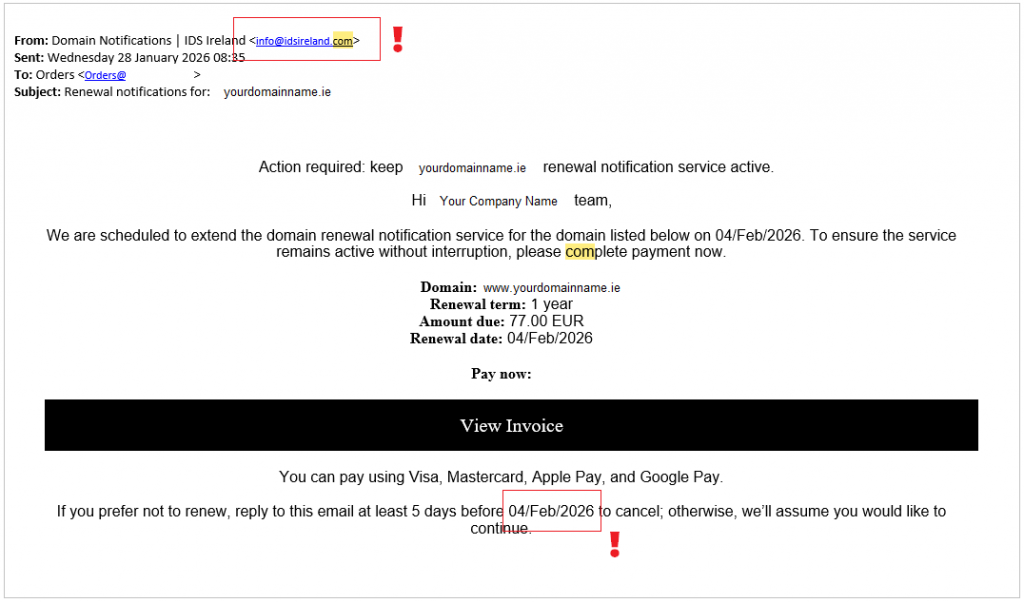
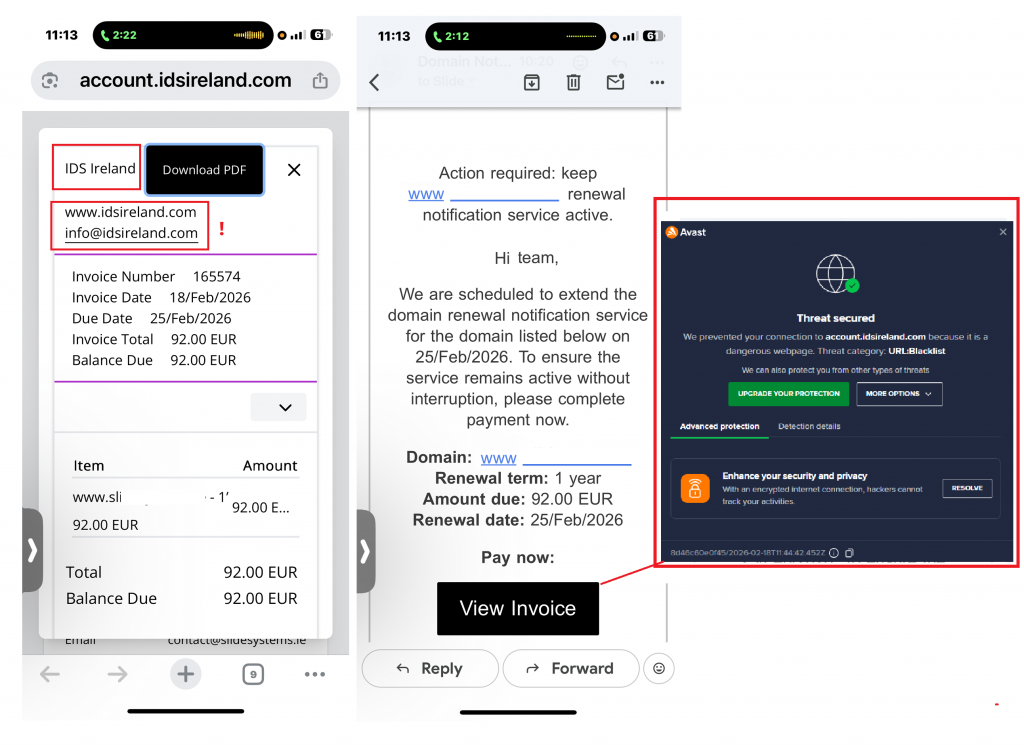
We’ve received numerous reports from clients about fraudulent domain renewal emails and invoices that appear to come from a company calling itself IDS Ireland. These messages try to look like legitimate renewal notices and urge immediate payment for a “domain renewal notification service.” They are not from us and are fraud.

How this scam works

  • Scammers send an email that looks like an invoice or renewal notice from IDS Ireland (info@idsireland.com or similar).
  • The message claims to be an official renewal for your domain and asks you to click a link or press a “View Invoice / Pay now” button.
  • The price quoted is often much higher than a normal renewal (we’ve seen amounts around €72–€92), and the goal is to get payment details or trick you into paying a fraudulent invoice.

How to spot a fake renewal email

  • Sender should be accounts@webworld.ie. If the message comes from any other address (for example info@idsireland.com), treat it as suspicious.
  • Unexpected invoice or unfamiliar company name. If you didn’t request a service, be suspicious.
  • High price compared with normal renewal costs. Scammers often charge multiple times the usual fee.
  • Urgency to pay now. Pressure to act quickly is a red flag.
  • Links that don’t match our website. Hover over links (without clicking) to check destinations.
  • Generic greetings or incorrect account details. Legitimate notices usually reference your account and control panel.

What to do if you receive one of these emails

1. Do not click any links or buttons.

2. Do not reply to the message. Replies can confirm your address is active.

3. Check your domain status directly by logging into your registrar account (do not use links in the email).

4. Forward the suspicious email to our support at support@webworld.ie and include the original message as an attachment or forwarded email.

5. Mark the email as spam or phishing in your email client.

6. If you already clicked a link but did not enter payment details, change any passwords you may have used and monitor accounts for suspicious activity.

7. If you entered payment details or paid, contact your bank or card issuer immediately to report potential fraud and request a charge dispute.

Who are IDS Ireland?

This is a fake company, it is not registered with the CRO in Ireland.

The domain idsireland.com was registered on the 1st of September 2024. However they have been opperatig for at least 7 years under diffent names including:

idseu.org
idsireland.org
idsmail.org
idsus.org
drnsbulgaria.org
drnsdenmark.org
drnsfinland.org
drnssk.org
drnssweden.org
drnsuk.org

The address on their website is 31-36 Ormond Quay Upper, Dublin, D07 EE37, which is a virtual office and essentially a mail forwarding service. They are using this virtual address in an attempt to look local.

Final Thoughts

Domain renewal scams like this are becoming more common and increasingly convincing. Scammers often use real WHOIS data (domain names and contact details from public sources) to make their messages look truthful and relevant, but that doesn’t mean they actually manage or control your domain.

If you receive a notice about your domain:

  • Always check directly with your actual registrar, log into your account instead of clicking links in the email.
  • Never pay an invoice from a company you don’t recognise. Your domain can only be renewed through the registrar you originally used.
  • Scammers rely on urgency and fear to get you to act without verifying the details, take a moment to double‑check first.

In short: stop, verify, and don’t pay until you are absolutely sure the request is genuine. If in doubt, contact your registrar or web support team before taking any action. If you have any questions please contact: support@webworld.ie

Scam Alert, Warning About Fake Domain Renewal Emails From IDS Ireland

Warning About Fake Domain Renewal Emails From IDS Ireland 22/02/2026

We’ve received numerous reports from clients about fraudulent domain renewal emails and invoices that appear to come from a company calling itself IDS Ireland. These messages try to look like legitimate renewal notices and urge immediate payment for a “domain renewal notification service.” They are not from your us and are attempts at fraud.

How this scam works

  • Scammers send an email that looks like an invoice or renewal notice from IDS Ireland (info@idsireland.com or similar).
  • The message claims to be an official renewal for your domain and asks you to click a link or press a “View Invoice / Pay now” button.
  • The price quoted is often much higher than a normal renewal (we’ve seen amounts around €72–€92), and the goal is to get payment details or trick you into paying a fraudulent invoice.

How to spot a fake renewal email

  • Sender should be accounts@webworld.ie. If the message comes from any other address (for example info@idsireland.com), treat it as suspicious.
  • Unexpected invoice or unfamiliar company name. If you didn’t request a service, be suspicious.
  • High price compared with normal renewal costs. Scammers often charge multiple times the usual fee.
  • Urgency to pay now. Pressure to act quickly is a red flag.
  • Links that don’t match our website. Hover over links (without clicking) to check destinations.
  • Generic greetings or incorrect account details. Legitimate notices usually reference your account and control panel.

What to do if you receive one of these emails

1. Do not click any links or buttons.

2. Do not reply to the message. Replies can confirm your address is active.

3. Check your domain status directly by logging into your registrar account (do not use links in the email).

4. Forward the suspicious email to our support at support@webworld.ie and include the original message as an attachment or forwarded email.

5. Mark the email as spam or phishing in your email client.

6. If you already clicked a link but did not enter payment details, change any passwords you may have used and monitor accounts for suspicious activity.

7. If you entered payment details or paid, contact your bank or card issuer immediately to report potential fraud and request a charge dispute.

Sample message from IDS Ireland

Who are IDS Ireland?

  • This is a fake company, it is not registered with the CRO in Ireland.
  • The domain idsireland.com was registered on the 1st of September 2024. However they have been opperatig for at least 7 years under diffent names including:

idseu.org
idsireland.org
idsmail.org
idsus.org
drnsbulgaria.org
drnsdenmark.org
drnsfinland.org
drnssk.org
drnssweden.org
drnsuk.org

  • The address on their website is 31-36 Ormond Quay Upper, Dublin, D07 EE37, which is a virtual office and essentially a mail forwarding service. They are using this virtual address in an attempt to look local.

Final Thoughts

Domain renewal scams like this are becoming more common and increasingly convincing. Scammers often use real WHOIS data (domain names and contact details from public sources) to make their messages look truthful and relevant, but that doesn’t mean they actually manage or control your domain.

If you receive a notice about your domain:

  • Always check directly with your actual registrar, log into your account instead of clicking links in the email.
  • Never pay an invoice from a company you don’t recognise. Your domain can only be renewed through the registrar you originally used.
  • Scammers rely on urgency and fear to get you to act without verifying the details, take a moment to double‑check first.

In short: stop, verify, and don’t pay until you are absolutely sure the request is genuine. If in doubt, contact your registrar or web support team before taking any action. If you have any questions please contact: support@webworld.ie