Why Email Forwarders Are No Longer Reliable
For many years, email forwarding was considered a simple and convenient way to manage business communications. Companies could create professional email addresses such as info@yourcompany.com and automatically forward incoming messages to a Gmail, Outlook, or Yahoo inbox.
While this setup worked well in the past, it is becoming increasingly unreliable. Businesses are reporting missing emails, messages landing in spam folders, and important communications that never reach their intended recipients.
At Web World, we regularly help clients troubleshoot email delivery issues, and one common factor continues to emerge: traditional email forwarding is no longer the dependable solution it once was.
What Changed?
The email landscape has evolved significantly over the last few years. Major providers such as Gmail, Microsoft Outlook, and Yahoo have strengthened their security requirements to combat spam, phishing attacks, and email spoofing.
As a result, email authentication protocols now play a critical role in determining whether a message is delivered successfully.
The three most important authentication standards are:
- SPF (Sender Policy Framework)
- DKIM (DomainKeys Identified Mail)
- DMARC (Domain-based Message Authentication, Reporting and Conformance)
These technologies help receiving mail servers verify that an email is genuinely sent by the domain it claims to represent.
Why Email Forwarding Causes Problems
When an email is forwarded, it passes through an additional mail server before reaching its final destination.
Although the message itself may be legitimate, the forwarding process can interfere with modern authentication checks.
SPF Failures
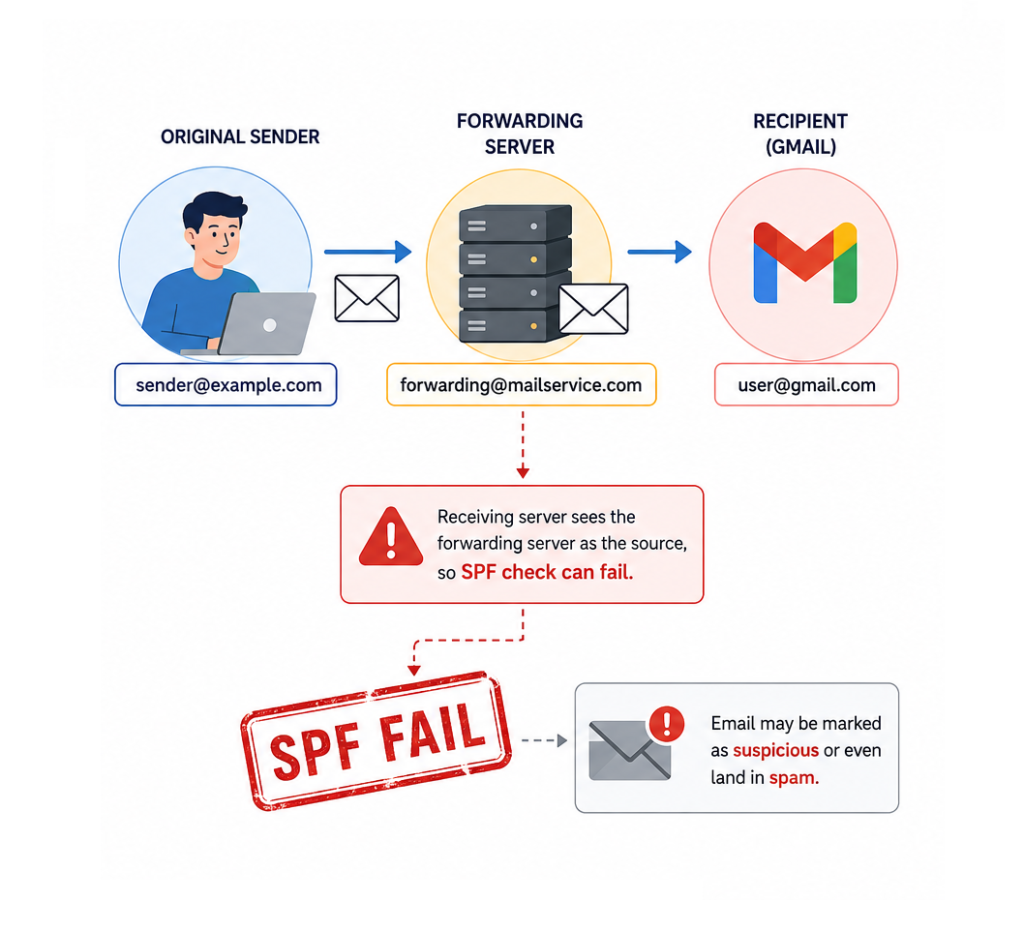
SPF records specify which servers are authorized to send email on behalf of a domain.
When a forwarded email arrives at Gmail or another provider, the receiving server may see the forwarding server—not the original sender—as the source of the message.
This can cause SPF validation to fail, making the email appear suspicious even though it originated from a trusted sender.
DKIM and Message Integrity
DKIM adds a digital signature to outgoing messages.
During the forwarding process, certain email headers may be modified. Even minor changes can sometimes affect the validation of the DKIM signature.
If both SPF and DKIM checks fail, the receiving server may reject the message entirely based on the sender’s DMARC policy.
Stricter Policies from Major Providers
Recent updates from Google and Yahoo have introduced stricter requirements for email authentication, especially for domains sending large volumes of email.
While these changes improve overall email security, they also expose weaknesses in older forwarding-based setups that many businesses still rely on.
The Risks for Businesses
Email delivery problems can have serious consequences.
A missed email could mean:
- Losing a potential customer inquiry
- Missing a quote request
- Delaying support responses
- Disrupting communication with suppliers or partners
- Damaging customer trust
The most concerning aspect is that these failures often happen silently. Neither the sender nor the recipient may realize that a message was blocked or discarded.
Better Alternatives to Email Forwarding
1. Use Direct Mailbox Access
Instead of forwarding messages, consider accessing your business mailbox directly through webmail, desktop email clients, or mobile applications.
This approach preserves the original authentication chain and significantly improves delivery reliability.
2. Connect Your Mailbox to Gmail or Outlook via POP3 or IMAP
Many businesses prefer using Gmail or Outlook as their primary interface. Rather than forwarding messages, these platforms can retrieve email directly from your hosting account using POP3 or IMAP.
This method avoids many of the authentication issues associated with traditional forwarding.
3. Upgrade to a Professional Email Platform
Solutions such as Google Workspace and Microsoft 365 provide enterprise-grade email infrastructure, advanced security features, and improved deliverability.
For businesses that rely heavily on email communication, these platforms often provide the most reliable long-term solution.
4. Review Your Email Authentication Settings
Properly configured SPF, DKIM, and DMARC records are essential for modern email communication.
Regular audits of your domain’s email configuration can help identify issues before they impact business operations.
How Web World Can Help
Email systems have become far more complex than they were a decade ago. What worked perfectly in the past may now create hidden delivery problems that affect your business every day.
At Web World, we help businesses review their email infrastructure, improve email authentication, and implement modern solutions that ensure important messages reach their destination.
Whether you are experiencing delivery issues or simply want to future-proof your email setup, our team can help you choose the right solution for your business.
Final Thoughts
Email forwarding remains a convenient feature, but it should no longer be viewed as a guaranteed method of email delivery.
As email providers continue to strengthen security standards, businesses need to adapt by implementing modern email practices and authentication methods.
Taking action now can help prevent missed opportunities, improve communication reliability, and ensure your business remains connected to customers when it matters most.