Archives October 2026

cPanel prices are going up again: why we recommend moving to DirectAdmin

post_content

28 Oct 2026 · @Dave Geoghegan

The short version

cPanel, the control panel behind many of our hosting plans, is raising its licence prices again. It is the eighth year in a row. From December 16, 2026 every cPanel licence tier costs roughly 8% to 10% more, and the charge for each extra account on a busy server goes up by over 12%.

We have absorbed most of these increases over the years, but we can no longer do that. From 1 November 2026 our cPanel hosting prices will go up.

There is a better option. Our DirectAdmin hosting runs on the same Dublin servers, gives you more storage, and costs less than cPanel. We will move you across for free, and we now recommend it for all our customers.

Who owns cPanel, and why prices keep rising

In August 2018 cPanel was bought by WebPros, a company backed by private equity firm Oakley Capital. WebPros already owned Plesk, the other big hosting control panel, and went on to buy WHMCS, the billing software most hosting companies use. In late 2019 a majority stake in WebPros was sold to CVC Capital Partners.

Within a year of the takeover, cPanel scrapped its simple per-server pricing and started charging by the number of hosted accounts. Since then prices have gone up every single year.

If that sounds familiar, it is the same playbook Broadcom used after buying VMware in November 2023. European cloud providers’ group CISPE reported VMware licence costs rising by 800% to 1,500% for many of its members. cPanel’s increases are nowhere near that bad, but the direction is the same: buy the software everyone depends on, then raise the price every year.

How cPanel prices have changed since 2019
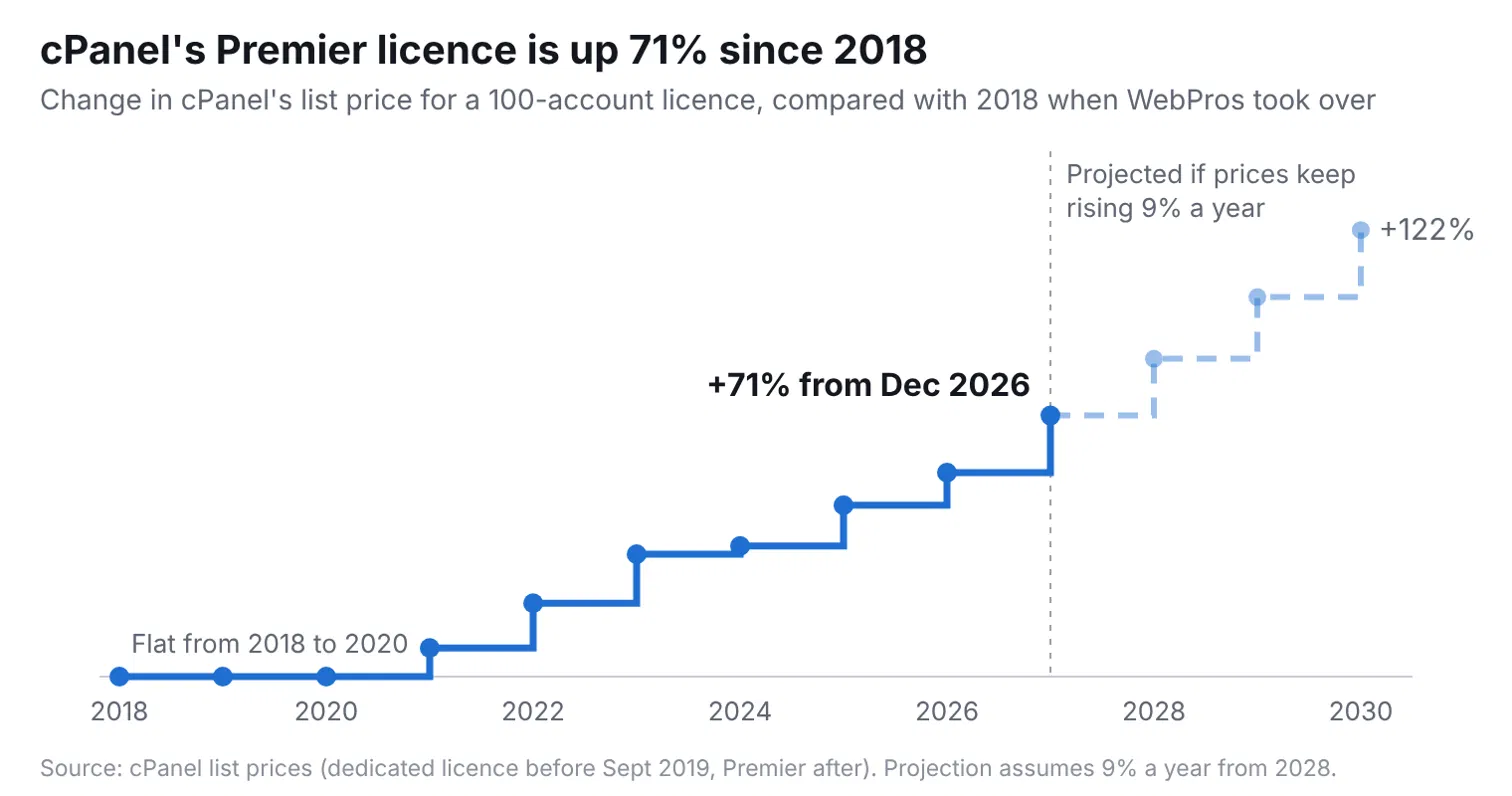
cPanel licence price increases 2019-2026

These are cPanel’s own list prices per server, per month, in US dollars.

Effective Solo (1 account) Admin (5 accounts) Pro (30 accounts) Premier (100 accounts) Each account over 100
Before mid 2019 $15 VPS: $20, unlimited accounts Dedicated: $45, unlimited accounts Free
Sept 2019 $15 $20 $30 $45 $0.20
Jan 2021 $15 $22 $32.25 $48.50 $0.30
Jan 2022 $15.99 $24.99 $35.99 $53.99 $0.34
Jan 2023 $15.99 $27.99 $39.99 $59.99 $0.39
Jan 2024 $17.49 $29.99 $42.99 $60.99 $0.40
Jan 2025 $26.99 $32.99 $46.99 $65.99 $0.45
Jan 2026 $29.99 $35.99 $53.99 $69.99 $0.49
Dec 16, 2026 $32.99 $38.99 $58.99 $76.99 $0.55

Since 2019 the Solo licence has more than doubled (up 120%), Admin and Pro have nearly doubled, Premier is up 71%, and the cost of each account over 100 has almost tripled (up 175%).

To put that in real terms: a server hosting 300 websites cost $45 a month to license in early 2019. From December it costs $186.99. That is more than four times as much for exactly the same software doing exactly the same job.

It is not just the licence

WebPros has also added new charges alongside the headline licence price:

  • Older operating system fees. Servers still running CentOS 7 or CloudLinux 7 now pay a monthly Extended Lifecycle Support fee on top of the licence, extended through the end of 2027.
  • Add-on increases. The security and performance tools we run on every cPanel server, such as CloudLinux, Imunify360 and KernelCare, are also going up from December 16.
  • WHMCS and Plesk. Our billing platform (WHMCS) and the Plesk control panel, both owned by the same group, rise by up to 20% in 2027.

Where prices are likely heading

Nobody outside WebPros knows future prices for certain. But the pattern since 2019 is steady: an increase every year, averaging roughly 9% to 10% on the main tiers and well over 10% on the per-account charge. If that continues, this is roughly where list prices will land:

Year (estimate) Solo Admin Pro Premier Each account over 100
2027 (confirmed) $32.99 $38.99 $58.99 $76.99 $0.55
2028 ~$36 ~$42.50 ~$64 ~$84 ~$0.61
2029 ~$39 ~$46 ~$70 ~$91 ~$0.68
2030 ~$43 ~$50 ~$76 ~$100 ~$0.75

Estimates assume 9% a year on licence tiers and 11% a year on the per-account charge. They are our projection, not cPanel’s.

On that path, a 100-account cPanel server will cost around $100 a month to license by 2030, more than double what it cost in 2019.

What this means for WebWorld customers

We buy cPanel licences in US dollars for every server we run, then pay again for the add-ons that keep your sites fast and secure. When those costs rise every year, we eventually have to adjust our prices.

From 1 November 2026, our cPanel hosting plans will be priced as follows (excluding VAT):

Plan Current monthly New monthly Current yearly New yearly
Europa €9.95 €10.95 €109.45 €120.45
Callisto €14.95 €15.95 €164.45 €175.45
Ganymede €19.95 €21.95 €219.45 €241.45
Titan €24.95 €27.95 €274.45 €307.45

If you are on an annual plan, your current price stays in place until your next renewal.

For VPS and dedicated servers where you pay for a cPanel licence directly, the licence charge will move in line with cPanel’s new list price from your next invoice after December 16, 2026.

Even after this change, our plans remain competitive with other Irish hosts, and you still get your site hosted in our own Dublin data centres, on our own network, with support from people in Dublin.

Our recommendation: move to DirectAdmin

DirectAdmin is a control panel that does the same everyday jobs as cPanel: email accounts, file manager, databases, SSL certificates and one-click WordPress installs through Softaculous. It runs in the same Dublin data centres, on the same network, with the same support team. Its licence costs a fraction of cPanel’s, and we pass that saving on to you.

Every cPanel plan has a DirectAdmin equivalent that hosts the same number of websites, with more storage, for less money:

Your cPanel plan New cPanel price DirectAdmin plan DirectAdmin price You save Storage Monthly transfer
Europa (5 sites) €10.95 Atlas (5 sites) €4.95 €6.00 a month 10GB → 25GB 100GB → 100GB
Callisto (50 sites) €15.95 Prometheus (50 sites) €9.95 €6.00 a month 25GB → 50GB 500GB → 200GB
Ganymede (100 sites) €21.95 Phoebe (100 sites) €15.95 €6.00 a month 35GB → 100GB 750GB → 500GB
Titan (150 sites) €27.95 Triton (150 sites) €19.95 €8.00 a month 50GB → 200GB 1TB → 1TB

Monthly prices, excluding VAT. Even at today’s cPanel prices, DirectAdmin works out €4 to €5 a month cheaper on every plan.

How the free move works

  1. Open a support ticket or reply to our email asking to move to DirectAdmin.
  2. Our Dublin team copies your website, databases and email accounts to your new DirectAdmin plan.
  3. You check everything on the new server before anything changes.
  4. We switch your DNS only when you are happy. Your website address and email addresses stay the same.
  5. Your bill drops to the DirectAdmin price from your next invoice. Unused credit from your cPanel plan will be deducted from your first DirectAdmin invoice.

Most moves are done within 24 hours, with no downtime.

Prefer to stay on cPanel?

That is fine. Your plan carries on as normal at the new price from 1 November 2026, and you do not need to do anything.

If you have a VPS or dedicated server with its own cPanel licence, talk to us. A DirectAdmin or Plesk licence can work out considerably cheaper, especially on servers with many accounts.

Questions?

Ready to move, or not sure which plan is right for you? Open a support ticket or call us on +353 1 495 1112. We will look at your account and recommend the right DirectAdmin plan.

Sources: cPanel pricing announcements and industry coverage of the 2019 to 2027 price changes. Prices in US dollars are cPanel list prices excluding tax.

Domain price changes from the 1st of November 2026

From 1 November 2026, the price of .com, .net and .org domain registrations, renewals and transfers at Web World will increase by €2.00 per year.

DomainCurrent price (per year)From 01/11/2026 (per year)
.com€18.95€20.95
.net€18.95€20.95
.org€18.95€20.95

The new price applies on your domain’s next renewal date on or after 1 November 2026. Renewing for several years before then locks in the current price for every year you add.

Why prices are going up

Every domain extension is run by a registry, which charges every registrar, including us, a fixed wholesale price for each year a domain is registered. When the registry raises that price, every registrar in the world pays more.

This year all three registries have raised their prices:

  • .com: Verisign, which runs .com, is raising its price by 6.9% on 1 November 2026. (Domain Name Wire)
  • .net: Verisign is raising the .net price by 10% on 1 March 2027. (Verisign)
  • .org: Public Interest Registry raised the .org price by about 11% on 1 June 2026, its first increase since 2016. (Domain Name Wire)

ICANN also charges a fee on every domain. All of these costs are billed to us in US dollars, so exchange rate movements also affect what we pay in euro.

Web World (IANA 3957) is an ICANN accredited registrar, so these wholesale prices apply to us directly.

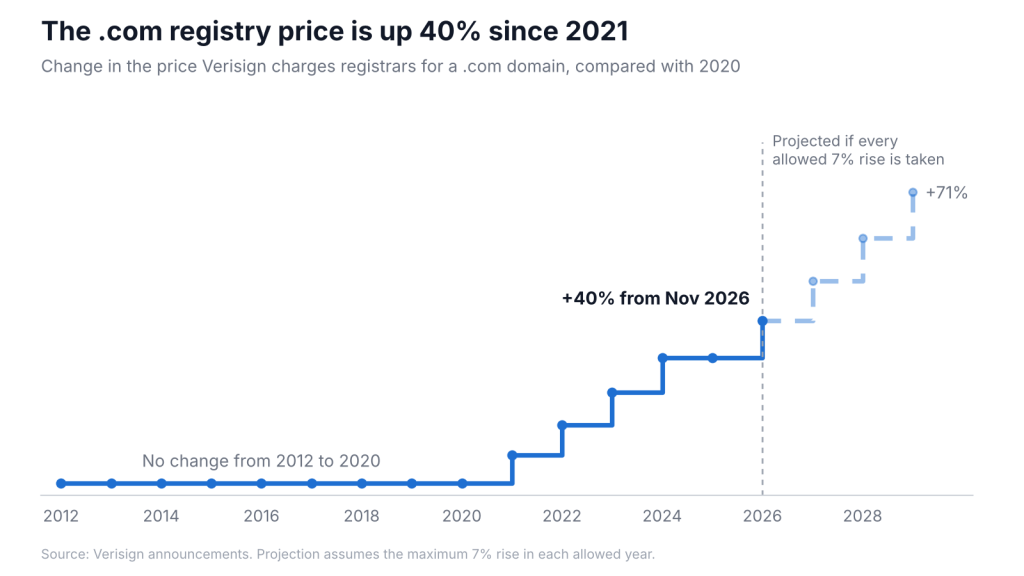
.com prices over the years

Since the price freeze ended in 2021, Verisign has raised the .com price at every opportunity its contract allows.

Expect more increases

These rises are built into the registries’ contracts, so we expect them to continue.

  • .com: Verisign’s agreement with ICANN and the US government lets it raise the price by up to 7% in four out of every six years. A new four-year window has just opened, and Verisign has taken every increase it was allowed since 2021. If that continues, the .com price could rise by more than 20% again by 2030. (OSIR)
  • .net: Verisign may raise the .net price by up to 10% every year, and has used close to the full 10% each time since 2012.
  • .org: ICANN removed the price cap on .org in 2019, so future increases are set by the registry.

Our own .com price tells the same story: €10.00 in 2021, rising to €20.95 from this November.

Lock in today’s price

The best way to protect yourself from future increases is to renew for several years at once. You pay today’s price for every year you add, so increases announced in the meantime will not affect you until those years run out.

Renew before 1 November 2026 and every year is charged at €18.95 instead of €20.95. For example, renewing a .com for 5 years now costs €94.75, compared with at least €104.75 at the new price, and more if prices keep rising as expected.

Most domains can be renewed for up to 10 years in total. Log in to your client area to extend your renewal, or contact us and we’ll do it for you.

If you have any questions, or would like help renewing, please get in touch with our team.

PHP2Shell: Critical PHP Vulnerabilities

Quick Summary

🟢 WebWorld customers: If you have a managed service or shared hosting account with WebWorld, we will patch this for you automatically. No action required – we’re handling it.

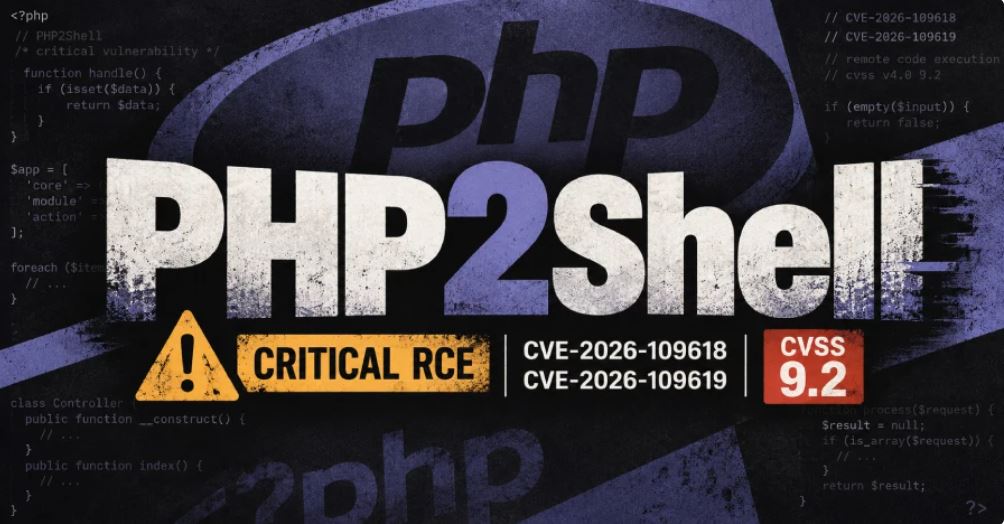
  • What: CVE-2026-109618 and CVE-2026-109619 – critical PHP vulnerabilities enabling Remote Code Execution (CVSS 9.2/10)
  • Who: ALL PHP versions from 5.4 through current 8.5 are vulnerable
  • Fixed versions: PHP 8.5.12+, 8.4.27+, 8.3.36+, and 8.2.35+ contain patches. PHP 5.4-8.1 have no upstream patch.
  • Risk Level: CRITICAL – allows unauthenticated remote code execution
  • Time to fix: For supported versions: update PHP and restart. For EOL versions: apply workaround (5-10 minutes)

Risk Assessment Matrix

ScenarioRisk LevelAction Required
PHP 8.2-8.5 (any configuration)🔴 CRITICALUpdate PHP TODAY to fixed version + restart
PHP 5.4-8.1 with file uploads🔴 CRITICALApply workaround TODAY or update PHP
PHP 5.4-8.1 (no file uploads)🟠 HIGHApply workaround this week
Any PHP version, patched and restarted✅ MITIGATEDMaintain baseline security; monitor for updates

The Vulnerability

On October 21, 2026, the PHP project released emergency patches for two critical vulnerabilities affecting the Zend Engine. Known publicly as CVE-2026-109618 and CVE-2026-109619, these flaws allow unauthenticated remote attackers to achieve Remote Code Execution (RCE) on any affected PHP installation.

What Each CVE Does

  • CVE-2026-109618 (Out-of-Memory Corruption): PHP can mishandle memory when a request causes it to run out of memory, allowing an attacker to corrupt memory and execute code.
  • CVE-2026-109619 (Stale Worker State): A PHP process can keep using data from a completed request after it should have been discarded. A later request handled by the same PHP process can use that stale data to execute code.

Both vulnerabilities can be exploited without authentication – any web visitor can potentially trigger them. A successful attacker gains access equivalent to the web server process: they can read files, access database credentials, steal data, or install a persistent backdoor.

How to Fix: Two Paths

Path A: If You’re Running PHP 8.2-8.5 (Supported Versions)

UPDATE PHP IMMEDIATELY. Security patches are available and should be installed at your earliest opportunity.

  • Minimum fixed versions: PHP 8.5.12, 8.4.27, 8.3.36, or 8.2.35
  • Linux distributions: Check your vendor (Ubuntu, CentOS, Debian, etc.) for updated packages – they may have backported the fix to older version numbers
  • After updating: You MUST restart PHP for the fix to take effect. All running PHP processes must use the new code.

Restart PHP After Updating

Update alone is not enough – restart your PHP service:

systemctl restart php-fpm* 2>/dev/null || systemctl restart php*-fpm 2>/dev/null
systemctl restart httpd 2>/dev/null || systemctl restart apache2 2>/dev/null
systemctl restart nginx 2>/dev/null

If you use Docker or containers, rebuild and redeploy from an updated base image.

Verify the update worked by checking your WordPress site – go to Tools - Site Health - Info - Server and confirm the PHP version shows 8.2.35+, 8.3.36+, 8.4.27+, or 8.5.12+.

Path B: If You’re Running PHP 5.4-8.1 (EOL Versions – No Patch Available)

These PHP branches are End-of-Life and will not receive upstream patches. You have two options:

Option B1: Upgrade to PHP 8.2+ (Recommended)

Contact your hosting provider and request an upgrade to PHP 8.2 or newer. Most modern hosting supports this. After upgrading, follow Path A above (restart PHP and verify the update).

Option B2: Apply the Workaround (Temporary, While Upgrading)

The primary attack vector exploits PHP’s internal session upload progress mechanism. Disabling this feature blocks the main attack path without requiring a full upgrade – though it does not provide complete protection.

session.upload_progress.enabled = Off

Will this break websites? Over 99% of modern websites do not use this feature. WordPress, modern CMS engines, and JavaScript frameworks handle upload progress via client-side browser APIs (XMLHttpRequest or fetch), entirely independent of PHP’s internal session tracker.

In the rare event that a legacy application depends on server-side upload tracking, the site will need to be upgraded to PHP 8.2+ or newer. There is no secure alternative for EOL runtimes.

Step-by-Step Workaround: Disabling Session Upload Progress

This is the temporary mitigation for PHP 5.4-8.1. If you’re on PHP 8.2+, see Path A above.

On Linux (Apache / NGINX / PHP-FPM)

Step 1: Find all php.ini files

Run this command as root to locate all active PHP configuration files:

find /etc /usr/local -name "php.ini" 2>/dev/null

Step 2: Apply the fix to all files

Update or add the setting automatically using sed:

find /etc /usr/local -name "php.ini" -exec sed -i 's/^;*session.upload_progress.enabled\s*=.*/session.upload_progress.enabled = Off/' {} +

If the setting doesn’t exist in older configs, append it:

find /etc /usr/local -name "php.ini" -exec sh -c 'grep -q "^session.upload_progress.enabled" "$1" || echo "session.upload_progress.enabled = Off" >> "$1"' _ {} \;

Step 3: Restart web services

For systemd-based distributions (CentOS, AlmaLinux, RHEL, Debian, Ubuntu):

systemctl restart php-fpm* 2>/dev/null || systemctl restart php*-fpm 2>/dev/null
systemctl restart httpd 2>/dev/null || systemctl restart apache2 2>/dev/null
systemctl restart nginx 2>/dev/null

On Windows (IIS / Apache)

Step 1: Locate all php.ini files

Open an elevated Command Prompt and search your drives:

dir C:\php.ini /s /b /a:-d
dir D:\php.ini /s /b /a:-d

Alternatively, using PowerShell:

Get-ChildItem -Path C:\, D:\ -Filter "php.ini" -File -Recurse -ErrorAction SilentlyContinue | Select-Object -ExpandProperty FullName

Step 2: Edit php.ini files

For each file found:

  • Open in Notepad (right-click – Edit as Administrator)
  • Find the [Session] section
  • Locate or add the line: session.upload_progress.enabled = Off
  • Ensure there is no semicolon ; at the beginning
  • Save the file

Step 3: Restart web services

For IIS, run in elevated Command Prompt:

iisreset

For Apache on Windows, restart the Apache service via Services (services.msc) or Command Prompt:

net stop Apache2.4
net start Apache2.4

Verification

Check your WordPress PHP version: Go to Tools - Site Health - Info - Server and note the PHP version displayed.

For Updated PHP (8.2.35+, 8.3.36+, 8.4.27+, or 8.5.12+):

If Site Health shows one of these versions (or higher), your server is patched and secure. No further action needed.

For the Workaround (EOL PHP versions):

To verify the workaround is active, run:

php -i | grep -i "session.upload_progress.enabled"

On Windows, use:

php -i | findstr /i "session.upload_progress.enabled"

The output should show:

session.upload_progress.enabled => Off => Off

Important Notes

  • This is a PHP vulnerability, not a WordPress issue. Updating WordPress does not install PHP patches. Your hosting provider controls PHP on shared and managed hosting.
  • Restarting PHP is critical. Updating the package alone won’t protect you if the old processes are still running. Always restart the service.
  • The workaround is temporary. It blocks the primary attack vector but does not provide complete protection. Plan to upgrade to supported PHP as soon as possible.
  • Public exploits are circulating. Apply fixes as soon as possible. Do not wait to see if an attack targets your specific setup.
  • Preserve logs: As a precaution, retain web server, PHP, and system logs covering at least 48 hours before October 21 through when PHP was patched and restarted. This helps detect any attempted exploitation.

Next Steps

  • PHP 8.2-8.5 users: Update PHP today and restart the service. Verify the version in WordPress Site Health.
  • PHP 5.4-8.1 users: Apply the workaround immediately, or contact your host about upgrading to PHP 8.2+.
  • WebWorld customers: We are handling this automatically. No action needed on your part.
  • Shared hosting customers (other providers): Contact your host and ask: “Are both CVE-2026-109618 and CVE-2026-109619 patched, and has PHP been restarted?”